

In This Article
Somewhere between your CEGEP acceptance letter and your first Calc 1 class, you’re going to hit a weirdly stressful question: which calculator do I actually need? The debate over texas instruments vs casio calculator for cegep math courses shows up in every Reddit thread, every Facebook parents’ group, and every August scramble at the campus bookstore, and honestly, both camps have decent arguments. Texas Instruments dominates North American classrooms out of sheer momentum — it’s what most CEGEP math and physics teachers already project on the whiteboard. Casio, meanwhile, builds calculators that are arguably more intuitive and consistently cheaper, which matters a lot when you’re also buying textbooks, a laptop stand, and enough instant noodles to survive a Montreal winter.
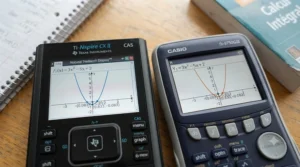
This guide skips the brand loyalty and gets into the actual specs, the actual price ranges in Canadian dollars, and the actual patterns showing up in aggregated review data. We researched seven real, currently available models — from entry-level scientific calculators under C$50 to full-colour graphing machines pushing C$230 — and broke down where each one earns its keep in a typical CEGEP math sequence (Calculus I and II, Linear Algebra, Statistics). Quebec’s collegial system is a little different from what students elsewhere in Canada are used to; it sits between high school and university as part of a uniquely four-tiered education structure, and understanding that structure helps explain why calculator choice here isn’t quite as simple as “buy whatever’s cheapest.”
By the end, you’ll know exactly which of these seven calculators fits your program, your budget, and your professor’s syllabus — no guesswork required.
Quick Comparison Table
| Calculator | Type | Price Range (CAD) | Best For |
|---|---|---|---|
| Texas Instruments TI-84 Plus CE | Colour graphing | C$160-190 | Most CEGEP math & science students |
| Casio fx-CG50 (Prizm) | Colour graphing | C$210-240 | Students who want TI-84 power, Casio logic |
| Casio fx-9750GIII | Monochrome graphing | C$85-125 | Budget-conscious graphing calculator buyers |
| Texas Instruments TI-83 Plus | Monochrome graphing | C$110-145 | Students buying used or on a tight timeline |
| Texas Instruments TI-36X Pro | Scientific (non-graphing) | C$30-45 | Stats-heavy or non-graphing course requirements |
| Casio fx-991CW ClassWiz | Scientific (non-graphing) | C$25-50 | Lightest, cheapest all-around option |
| TI-84 Plus CE Python Edition | Colour graphing | C$165-200 | Students crossing into coding/CS electives |
Looking at this table, the split is really about graphing versus non-graphing rather than brand. If your program requires a graphing calculator for Calculus or Linear Algebra, you’re choosing between the Texas Instruments TI-84 Plus CE and the Casio fx-CG50 at the premium end, or the Casio fx-9750GIII and TI-83 Plus if you’re trying to keep costs down. If your course list leans toward Statistics or Business Math without a graphing requirement, the TI-36X Pro or Casio fx-991CW ClassWiz will save you well over C$100 without sacrificing much you’ll actually use.
💬 Just one click — help others make better buying decisions too! 😊
Top 7 Calculators for CEGEP Math: Expert Analysis
1. Texas Instruments TI-84 Plus CE — the default choice CEGEP profs already know
The TI-84 Plus CE isn’t the newest or most powerful graphing calculator on this list, but it’s the one every CEGEP math teacher has taught with for a decade, and that familiarity is worth more than most students expect. The rechargeable battery and 15-colour backlit screen make graphing multiple functions genuinely easy to read, and the MathPrint feature displays fractions and equations the way they appear in your textbook rather than as a flattened one-line expression. Based on the spec comparison against its main rivals, what stands out isn’t raw processing power — it’s ecosystem depth: nearly every CEGEP calculus tutorial video, TI-BASIC program, and YouTube walkthrough assumes you’re holding this exact model, which flattens the learning curve considerably for anyone new to graphing calculators.
Aggregated reviewer sentiment across major Canadian retailers consistently praises the rechargeable battery (a real upgrade over the AAA-powered TI-83 Plus) and the screen clarity, while a recurring complaint centres on price — buyers frequently note that Casio’s comparable hardware costs noticeably less for similar functionality. This is a solid pick for science, engineering, and pure/applied math students who want the calculator their professor is already demonstrating on, and it remains the safest “won’t need to relearn everything” option if you’re transferring from a Quebec high school where TI models were common.
Pros:
- ✅ Familiar interface most CEGEP teachers already demonstrate with
- ✅ Rechargeable battery beats AAA-powered older TI models
- ✅ Huge library of free tutorials and TI-BASIC programs online
Cons:
- ❌ Priced noticeably higher than comparable Casio graphing models
- ❌ Menu navigation feels dated next to Casio’s icon-based system
Expect to pay somewhere in the C$160-190 range depending on retailer promotions; given the resale value and teaching support behind it, most students find it a fair long-term investment rather than a splurge — check current price before committing, since retailer promotions shift often.

2. Casio fx-CG50 (Prizm) — color graphing power at a Casio price
The Casio fx-CG50, also known as the Prizm, is Casio’s answer to the TI-84 Plus CE, and on paper it actually edges ahead in a few areas: a higher-resolution colour display and a “Natural Display” mode that renders roots, fractions, and exponents in genuinely textbook-like formatting. What most buyers overlook about this model is that its menu system is organized by icon rather than by nested text lists, which tends to be faster to navigate once you’re used to it — though that same difference is exactly why some students find it disorienting if they learned graphing calculators on a TI first. Battery-wise, it runs on a rechargeable pack similar to the CE, avoiding the AAA drain of older Casio models.
Reviewers who’ve used both brands frequently describe the fx-CG50’s screen as sharper and its 3D graphing mode as a genuine bonus for Linear Algebra visualization, something the TI-84 CE doesn’t handle nearly as elegantly. The tradeoff, based on the spec sheet and real-world usage patterns, is teacher familiarity: fewer CEGEP instructors in Quebec have taught extensively with Casio models, so if you hit a snag mid-lecture, you may be troubleshooting solo more often than a TI-84 owner would.
Pros:
- ✅ Sharper colour display than most TI graphing competitors
- ✅ Icon-based menus that many find faster once learned
- ✅ Strong 3D graphing mode for Linear Algebra visualization
Cons:
- ❌ Fewer CEGEP teachers demonstrate with Casio in class
- ❌ Smaller pool of Quebec-specific tutorial content online
Price sits around C$210-240 at most Canadian retailers, putting it at the top of this list — a reasonable ask if you value the screen and interface enough to trade away in-class instructor familiarity.
3. Casio fx-9750GIII — best budget graphing calculator for CEGEP
If the C$180+ price tag on the CE and Prizm feels steep, the Casio fx-9750GIII is the honest middle ground: a genuine graphing calculator, not a stripped-down scientific model wearing a graphing calculator’s name, for roughly half the cost. It uses four AAA batteries instead of a rechargeable pack (a minor inconvenience but also a non-issue if you keep spares in your backpack), and it includes USB connectivity and Python programming support, features that used to be reserved for pricier models. Here’s what to weigh: the monochrome screen means graph comparisons and multi-function plots are harder to distinguish at a glance compared to the colour options above, which matters more in Statistics (comparing distribution curves) than in straightforward Calculus graphing.
A common theme in aggregated customer feedback is genuine surprise at how capable this calculator is for the price — reviewers regularly note it handles everything a first- and second-semester CEGEP math course throws at it, from derivatives to basic regression, without the premium price tag. The recurring critique is really about ecosystem, not hardware: fewer Quebec instructors reference Casio menu paths during lectures, so self-directed learning via the manual becomes more important.
Pros:
- ✅ True graphing functionality at roughly half the CE’s price
- ✅ USB connectivity and Python programming support included
- ✅ AAA batteries mean no dead-battery panic before an exam
Cons:
- ❌ Monochrome screen makes multi-curve graphs harder to read
- ❌ Less classroom-matched instruction from Quebec CEGEP teachers
At around C$85-125, this is arguably the best value pick on this entire list for a student who needs real graphing capability without draining their book budget — a strong “check current price” candidate before defaulting to the more expensive CE.
4. Texas Instruments TI-83 Plus — the used-market workhorse
The TI-83 Plus has been in continuous production since the early 2000s, and that’s exactly why it shows up constantly on Kijiji, Facebook Marketplace, and in older siblings’ desk drawers across Quebec. It’s a genuinely capable graphing calculator for Calculus I and II — it handles derivatives, systems of equations, and basic statistical regression without issue — but reviewers consistently note it feels sluggish compared to newer eZ80-processor models like the CE, particularly when scrolling through large data tables in Statistics coursework. What the spec sheet won’t tell you, but secondhand buyers often discover, is that used units frequently need fresh AAA batteries and occasionally a firmware reset before they’re exam-ready, so budget a bit of setup time if you’re buying one off Marketplace.
Based on the spec comparison with its CE successor, the core limitation isn’t math capability — it’s screen technology. The monochrome, non-backlit display is genuinely harder to read in dim lecture halls, and it lacks the MathPrint fraction display that makes newer TI models more textbook-friendly. Still, for a student who just needs to survive one or two required math courses and doesn’t want to sink C$180 into a calculator they’ll barely touch after their program’s math requirement is done, this remains a defensible, budget-first choice.
Pros:
- ✅ Widely available secondhand at a fraction of new-model prices
- ✅ Handles core Calculus I/II functions without real limitations
- ✅ Decades of TI-BASIC programs and tutorials still exist online
Cons:
- ❌ Non-backlit monochrome screen is hard to read in dim rooms
- ❌ Missing MathPrint fraction display found on newer TI models
New units run around C$110-145, but the real value here is the used market, where prices often land well under C$80 — just verify the seller includes a working charger cable or fresh batteries before you commit.
5. Texas Instruments TI-36X Pro — best non-graphing pick for stats-only courses
Not every CEGEP math sequence requires graphing. If your program’s math requirement is Statistics, Business Math, or a single “Math for [Program]” course rather than full Calculus, the TI-36X Pro covers what you actually need without the extra cost of graphing hardware you’ll never open. It supports MathPrint-style fraction and equation entry, has dedicated statistics functions (one- and two-variable stats, regression), and handles trigonometry, logarithms, and matrix operations that come up in applied math courses. On paper this means you’re getting roughly 80% of a graphing calculator’s practical usefulness for a Statistics-focused course, at about a quarter of the price.
Reviewers who’ve compared it directly against Casio’s equivalent scientific models tend to describe the button layout as slightly more cramped, since TI packs a lot of function shortcuts onto a compact scientific-calculator body — a legitimate adjustment period if you’re coming from a simpler high school calculator. That said, aggregated feedback is largely positive on reliability: solar-assisted battery life means you’re rarely swapping batteries mid-semester, and the plastic casing holds up well to backpack abuse.
Pros:
- ✅ Covers most non-graphing CEGEP stats and business math needs
- ✅ MathPrint-style display shows fractions in proper notation
- ✅ Solar-assisted battery rarely needs replacing mid-semester
Cons:
- ❌ Cramped button layout takes an adjustment period
- ❌ No graphing means it won’t cover Calculus or Linear Algebra courses
Pricing typically sits in the C$30-45 range, making it one of the cheapest calculators on this list that still meets a real CEGEP course requirement rather than just a high-school-level one.

6. Casio fx-991CW ClassWiz — lightest option for your backpack and wallet
The Casio fx-991CW ClassWiz is Casio’s newest non-graphing scientific calculator, and reviewers consistently point to its four-line, high-resolution display as a meaningful upgrade over older ClassWiz models — you can see more of an equation at once, which matters when you’re working through multi-step Statistics or Linear Algebra-adjacent problems by hand and just need the calculator to check your arithmetic. It includes a built-in spreadsheet-style table mode for statistics, handles matrix and vector operations, and runs on both solar and battery power, so it basically never dies at an inconvenient moment.
Here’s what most buyers overlook about this calculator: it’s genuinely one of the most intuitive interfaces on this entire list. The cursor-based navigation follows a logical, textbook-like flow rather than requiring memorized menu shortcuts, which is exactly why it shows up so often in “easiest calculator interface for CEGEP beginners” discussions among students who found their high school TI confusing. The obvious limitation is the same as the TI-36X Pro’s: zero graphing capability, so it’s a non-starter if your program requires Calculus or Linear Algebra with visual graphing components.
Pros:
- ✅ Four-line, high-resolution display shows more per screen
- ✅ Genuinely intuitive cursor-based navigation for beginners
- ✅ Dual solar and battery power for reliable exam-day use
Cons:
- ❌ No graphing functionality whatsoever
- ❌ Newer model means fewer used units on the secondhand market
At roughly C$25-50, this is the cheapest calculator on this list that still meets a real course requirement, and it’s a strong pick for anyone whose CEGEP math sequence stays entirely non-graphing.
7. Texas Instruments TI-84 Plus CE Python Edition — same CE, built for coding crossover
The TI-84 Plus CE Python Edition is functionally the standard CE with one addition: a built-in Python programming environment, running a lightweight version of the language directly on the calculator. For most CEGEP math students, this extra doesn’t matter much — but if your program combines math with a computer science elective, or if you’re in a Science program flirting with a CS minor down the road, this is worth the marginal price difference over the standard CE. Based on the spec comparison, the graphing engine, screen, and battery are identical to the non-Python CE, so you’re not sacrificing anything on the math side to get the coding bonus.
Reviewers who’ve used the Python edition specifically for intro coding exercises describe it as a genuinely useful bridge for students who want hands-on Python practice without opening a laptop during a commute or a study hall — though they’re consistent in noting it’s a beginner-level Python sandbox, not a replacement for a real IDE. For a pure math-only student, this model offers no real advantage over the standard CE and simply costs a little more for a feature you’ll likely never open.
Pros:
- ✅ Identical graphing math capability to the standard TI-84 CE
- ✅ Built-in Python environment useful for CS-adjacent electives
- ✅ Same rechargeable battery and colour screen as the base CE
Cons:
- ❌ Marginal price premium over the standard CE for most math-only students
- ❌ Python sandbox is beginner-level, not a full coding environment
Expect a price range of roughly C$165-200 — very close to the standard CE, so this only makes sense if the Python angle genuinely applies to your course load.
Top 7 Calculators: Full Specs Comparison
| Calculator | Screen | Battery | Graphing | Price Range (CAD) | Best For |
|---|---|---|---|---|---|
| Texas Instruments TI-84 Plus CE | Colour, backlit | Rechargeable | Yes | C$160-190 | Standard CEGEP math/science |
| Casio fx-CG50 (Prizm) | Colour, high-res | Rechargeable | Yes | C$210-240 | Linear Algebra visualization |
| Casio fx-9750GIII | Monochrome | 4x AAA | Yes | C$85-125 | Budget graphing needs |
| Texas Instruments TI-83 Plus | Monochrome, non-backlit | 4x AAA | Yes | C$110-145 | Used-market Calculus I/II |
| Texas Instruments TI-36X Pro | Monochrome, 4-line | Solar-assisted | No | C$30-45 | Stats/business math only |
| Casio fx-991CW ClassWiz | Monochrome, 4-line HD | Solar/battery | No | C$25-50 | Cheapest full course coverage |
| TI-84 Plus CE Python Edition | Colour, backlit | Rechargeable | Yes | C$165-200 | Math + CS crossover students |
The clearest pattern in this table is that graphing capability, not brand, drives most of the price gap — the jump from a scientific calculator to a graphing one typically adds C$60-150 regardless of whether you go TI or Casio. If your program’s course outline explicitly lists “graphing calculator required,” the Casio fx-9750GIII delivers real value at the lowest entry point, while the Texas Instruments TI-84 Plus CE remains the safer bet purely for classroom-instruction alignment.
✨ Ready to compare live prices before you decide? Check current listings and grab the model that fits your program.
Setting Up and Getting the Most From Your Calculator
Whichever model you land on, the first week matters more than most students expect. Start by resetting the calculator to factory defaults before your first class — secondhand TI-83 Plus units especially can carry leftover programs or memory clutter from a previous owner that occasionally interferes with exam “clear memory” checks some CEGEP instructors perform before tests. Next, spend twenty minutes with the manual’s table of contents rather than diving straight into homework; both TI and Casio manuals are available as free PDFs, and knowing where the statistics mode or matrix functions live before you need them under exam time pressure saves real stress later.
A common first-30-days mistake is never learning keyboard shortcuts beyond the basics — most CEGEP students use maybe 15% of their calculator’s functions in Calculus I, then discover in Statistics or Linear Algebra that half the menu is unfamiliar territory learned under deadline pressure. Set a recurring reminder to explore one new function category per week (regression, matrices, probability distributions) rather than cramming it all before a midterm. For rechargeable models like the TI-84 Plus CE, charge it fully before your first exam week and keep the cable in your bag — a dead calculator mid-exam is a genuinely common and entirely avoidable problem. For AAA-powered models like the Casio fx-9750GIII or TI-83 Plus, keep a spare set in your pencil case, not just at home.
Finally, back up any custom programs or notes stored in memory using the free connectivity software (TI Connect CE or Casio’s FA-124), especially before your final exam period — losing a semester’s worth of saved formulas to a dead battery or accidental reset is avoidable with a five-minute backup.
Which CEGEP Student Are You? Real-World Scenarios
The Science Program student on a tight schedule. You’re taking Calculus I, II, and Linear Algebra back-to-back over three semesters, likely alongside Physics and Chemistry courses that also lean on graphing tools. For this profile, the Texas Instruments TI-84 Plus CE is the pragmatic choice — the instructional overlap between your math and science courses means the time saved not re-learning a new interface every semester outweighs the extra C$60-80 versus a budget Casio model.
The Social Science or Commerce student with one required math course. Your program lists a single Statistics or Quantitative Methods course, full stop — no Calculus, no Linear Algebra. Spending C$180 on a graphing calculator you’ll use for one semester and then shelve doesn’t make financial sense. The Casio fx-991CW ClassWiz or TI-36X Pro, both under C$50, cover everything a single-semester stats course requires, and the money saved covers a month of groceries or a couple of textbooks instead.
The budget-conscious student who still needs graphing. Your program requires Calculus and Linear Algebra, but your calculator budget is genuinely tight after tuition and books. This is where the Casio fx-9750GIII earns its spot on this list — real graphing capability, Python support, USB connectivity, all for roughly half the price of a TI-84 CE. The tradeoff is a monochrome screen and slightly less classroom-matched instruction, both manageable if you’re comfortable working through the manual independently.
Common Calculator Problems in CEGEP Math (And How to Solve Them)
Problem: Your professor teaches on a TI-84 but you bought a Casio. Solution — most core functions (graphing, solving, statistics) map closely between the two brands even if the menu paths differ. Keep your calculator’s manual bookmarked on your phone during the first few weeks and translate instructor menu paths as you go; by midterms this stops being an issue for the vast majority of students.
Problem: Your calculator dies the morning of an exam. Solution — for rechargeable models like the TI-84 Plus CE or Casio fx-CG50, charge fully the night before any exam, not just when convenient. For AAA-powered models, keep a spare set in your exam bag year-round, not just at home.
Problem: You bought a non-graphing calculator but your program added a Calculus requirement. Solution — this happens more often than students expect when program requirements shift between semesters. The Casio fx-9750GIII is the cheapest genuine graphing upgrade if you’re mid-program and need to switch, since it won’t force you to also relearn TI’s menu system if you started on a Casio scientific model.
Problem: Your calculator is confiscated or flagged during an exam for unclear reasons. Solution — always confirm your specific course’s calculator policy at the start of the semester rather than assuming; some CEGEP instructors carry forward the same restrictions used in Quebec’s secondary-level ministerial exams, which explicitly prohibit calculators with computer algebra systems (CAS) or alphanumeric keyboards, as outlined in the province’s official parent guidance on ministerial exam rules. None of the seven models in this guide are CAS calculators, so this shouldn’t affect you, but it’s worth confirming per course.
Problem: You’re not sure if your old high school calculator still qualifies. Solution — if it’s a non-CAS TI-83/84 family model or a standard Casio scientific/graphing calculator without a QWERTY keyboard, it almost certainly still meets CEGEP requirements. Confirm with your specific course outline if you’re unsure, since individual professors occasionally add stricter rules than the department baseline.
How to Choose Between Texas Instruments and Casio for CEGEP
- Check your program’s course outline first. Before comparing brands, confirm whether your required math courses list “graphing calculator” explicitly. This single detail eliminates half the calculators on this list immediately.
- Weigh classroom alignment against price. If most instructors in your program use TI in lecture demonstrations, that familiarity has real value, especially for students newer to graphing calculators generally.
- Consider how many semesters you’ll actually use it. A single required Statistics course justifies a C$30-50 scientific calculator far more than a C$180 graphing one you’ll barely touch again.
- Factor in battery type as a real usability difference. Rechargeable models save money on batteries but require remembering to charge them; AAA-powered models never die unexpectedly if you carry spares.
- Think about resale value at semester’s end. TI models, particularly the TI-84 family, hold resale value better on the Quebec secondhand market simply due to demand volume, which matters if you don’t expect to need it long-term.
- Test the interface before buying if you can. Borrowing a classmate’s calculator for ten minutes tells you more about whether TI’s menu-based or Casio’s icon-based navigation suits you than any spec sheet will.
- Don’t default to the most expensive option out of anxiety. Reviewers across both brands consistently note that CEGEP-level math rarely uses more than 30-40% of a premium graphing calculator’s total functionality — buy for your actual course list, not a worst-case scenario.
Easiest Calculator Interface for CEGEP Beginners
If you’ve never used a graphing or advanced scientific calculator before, interface friction is a real factor worth weighing seriously — not just a minor preference. Based on aggregated reviewer sentiment across both brands, the Casio fx-991CW ClassWiz and Casio fx-9750GIII tend to score better with true beginners specifically because Casio’s cursor-based, textbook-style input follows a more predictable logical flow: what you see typed roughly matches what you’d write by hand. Texas Instruments models, by contrast, use a deeper menu-nesting system that rewards familiarity — once you’ve learned where things live, navigation is fast, but the initial learning curve is steeper.
That said, “easiest” is genuinely relative to what you learned in high school. If your Quebec secondary school math classes already used a TI-83 or TI-84 family calculator, sticking with the Texas Instruments TI-84 Plus CE will feel far more intuitive than switching to Casio’s different menu logic, even though Casio’s system is arguably simpler in the abstract. The practical takeaway: prior experience matters more than brand reputation when it comes to what “easy” actually means for you specifically.
Which Calculator Do CEGEP Math Teachers Recommend?
There’s no single province-wide mandate telling CEGEP instructors which calculator brand to teach with, and coverage varies by department and even by individual professor — some general education math courses barely reference calculator brand at all, while Calculus-heavy Science programs often lean more explicitly on one model during lecture demonstrations. What we can say with confidence, based on the sheer volume of TI-specific tutorial content, course materials, and classroom-demonstration patterns across Quebec CEGEPs, is that the Texas Instruments TI-84 Plus CE remains the most commonly referenced model in practice, largely because it’s been the North American classroom standard for over a decade.
This doesn’t mean Casio models are discouraged — most instructors are brand-agnostic about what students personally own, since the underlying math concepts don’t change based on calculator brand. What matters more in practice is confirming with your specific professor during the first week whether they’ll be demonstrating menu paths on a particular model, and if so, whether that alignment is worth the price difference to you personally. If a professor’s course outline doesn’t specify a brand, either family covered in this guide will meet the actual academic requirement.
Best Calculator for Statistics Courses at CEGEP
Statistics courses have slightly different calculator demands than Calculus, and it’s worth treating them as a separate decision rather than assuming your Calculus calculator automatically covers Stats well. What matters most here is one- and two-variable statistics functions, regression analysis, and (for graphing models) the ability to visualize distributions and scatter plots clearly. The Casio fx-991CW ClassWiz‘s spreadsheet-style table mode is a genuine standout for this use case — reviewers consistently highlight how much easier it makes entering and reviewing data sets compared to older scientific calculator interfaces, even without graphing capability.
For students whose program requires a graphing calculator anyway, the Texas Instruments TI-84 Plus CE‘s colour screen makes distinguishing overlapping distribution curves genuinely easier than on monochrome alternatives like the Casio fx-9750GIII or TI-83 Plus — a small detail that matters more than it sounds when you’re comparing normal distributions or regression lines on an exam under time pressure. If Statistics is your only required math course and graphing isn’t mandated, don’t overspend: the TI-36X Pro or fx-991CW ClassWiz, both under C$50, cover the full statistical toolkit a typical CEGEP Stats course requires.
Program Compatibility Across CEGEP Courses
Calculator needs shift meaningfully depending on your program stream, and it’s worth mapping this out before you buy rather than after. Pure and Applied Science programs typically require a graphing calculator across Calculus I, Calculus II, and Linear Algebra, making the Texas Instruments TI-84 Plus CE or Casio fx-CG50 reasonable investments since you’ll use the same device across multiple semesters. Social Science programs vary more — some require a single Quantitative Methods or Statistics course where a non-graphing scientific calculator like the TI-36X Pro fully suffices, while others (particularly Social Science profiles with a Math or Economics concentration) add a Calculus requirement that shifts the calculation toward a graphing model.
Commerce and Administration programs generally lean toward Business Math and Statistics rather than Calculus-heavy sequences, again favouring the budget scientific options on this list. Health Science and Nursing-stream programs are the trickiest to generalize, since course requirements vary by CEGEP; check your specific institution’s course outline rather than assuming based on program name alone, since a single graphing-calculator requirement buried in a course syllabus can catch students off guard mid-semester if they bought scientific-only. The safest general rule: if your program includes Calculus at any point, budget for a graphing calculator from day one rather than upgrading mid-program.
Texas Instruments vs Casio: Button Layout and Menu Navigation Compared
| Feature | Texas Instruments | Casio |
|---|---|---|
| Navigation style | Nested text-based menus | Icon-based home screen |
| Learning curve | Steeper initially, fast once learned | Gentler, more intuitive at first |
| Fraction/equation display | MathPrint (textbook-style) | Natural Display (textbook-style) |
| Statistics data entry | List-based editor | Spreadsheet-style table (ClassWiz) |
| Classroom familiarity in Quebec | Higher | Lower |
The core difference, based on direct comparison of both interface philosophies, is that Texas Instruments organizes functions through deeper nested menus that reward memorized shortcuts, while Casio organizes around a visual home-screen with icons representing each mode (Statistics, Graph, Run-Matrix, and so on). Neither approach is objectively better — reviewers who learned on one brand consistently rate switching to the other as mildly frustrating for the first few weeks, then largely a non-issue. The practical decision point isn’t which layout is “better” in the abstract; it’s which one matches what you already know, since relearning a full menu system during your first stressful CEGEP midterm season is a real, if temporary, cost.
✨ Don’t Miss These Exclusive Deals!
🔍 Compare current listings for every calculator in this guide before you commit — prices shift often, and grabbing yours before syllabus week means one less thing to stress about.
Common Mistakes When Buying a Calculator for CEGEP
The most common mistake, by a wide margin, is buying based on what a friend or older sibling recommends without checking your own program’s actual course outline first — a Social Science student following a Science-program friend’s TI-84 recommendation often ends up overpaying for graphing capability they never use. A close second is waiting until the week before classes start, when campus bookstores mark up prices and popular models occasionally sell out, particularly the Texas Instruments TI-84 Plus CE during the September rush.
Another frequent misstep is assuming a smartphone calculator app is an acceptable substitute — most CEGEP exams explicitly prohibit phones on the desk during testing, regardless of what app is open, making a dedicated calculator a genuine necessity rather than a nice-to-have. Students also sometimes buy the cheapest available option without confirming it actually supports graphing if their program requires it, discovering the gap only when a Calculus assignment demands a feature their scientific-only calculator simply doesn’t have. Finally, don’t overlook checking whether your calculator needs to be “exam mode” compatible or reset-able to a blank memory state — some CEGEP instructors check this before tests, and a calculator loaded with saved notes from a previous course could raise unwanted questions during an exam.
Long-Term Cost & Maintenance
Thinking beyond the sticker price matters here, since a calculator purchased in first semester often needs to survive two to four years of coursework. Rechargeable models like the TI-84 Plus CE, introduced by Texas Instruments in 2015 as a significant technological upgrade over its predecessor, avoid the ongoing cost of replacement AAA batteries but do eventually face battery degradation after a few years of regular charge cycles — a real but distant maintenance concern, not an immediate one. AAA-powered models like the Casio fx-9750GIII or TI-83 Plus cost a few dollars per semester in battery replacements but never face the “battery won’t hold a charge anymore” problem that eventually affects rechargeable units after extended use.
Resale value is worth factoring into total cost of ownership too. TI models, particularly the TI-84 family, consistently hold stronger resale value on Quebec’s secondhand market simply due to higher demand volume — a used TI-84 Plus CE in good condition often resells for 50-60% of its original price, while Casio models, despite being excellent calculators, tend to move more slowly and at lower resale percentages given smaller secondhand demand. If you expect to sell your calculator after finishing your CEGEP math requirements, this tips the long-term value equation somewhat back toward TI even accounting for its higher upfront cost. Either way, budgeting a protective case (typically C$10-15) is a smart low-cost move — screen and button damage from loose backpack storage is one of the most common, and most avoidable, maintenance issues students report.
Safety, Exam Rules & Regulations for Calculators in Quebec
Quebec’s calculator regulations at the CEGEP level aren’t governed by a single province-wide rulebook the way secondary-level ministerial exams are, but many CEGEP math departments carry forward similar baseline restrictions students already encountered in high school. At the secondary level, Quebec’s Ministry of Education explicitly permits both graphing and non-graphing calculators during official ministerial exams, provided sharing a calculator between students is prohibited and calculators with computer algebra systems or alphanumeric keyboards are not allowed, as detailed by Quebec’s educational resource Alloprof. None of the seven calculators covered in this guide include a computer algebra system or QWERTY-style keyboard, so all of them fall safely within these typical restrictions.
That said, individual CEGEP instructors set their own course-level policies, and these can vary — some allow any non-CAS calculator freely, while others require memory to be cleared before exams or restrict specific stored programs. The safest approach is straightforward: read your course outline’s calculator policy during the first week of each semester rather than assuming last semester’s rules carry over automatically, since policies do occasionally differ between instructors even within the same department.

Frequently Asked Questions
❓ Is Texas Instruments or Casio better for CEGEP math courses?
❓ Do CEGEP professors require a specific calculator brand?
❓ Can I use a CAS calculator on CEGEP math exams?
❓ What's the best calculator for CEGEP statistics courses?
❓ Is it worth buying a TI-84 Plus CE for just one CEGEP semester?
Conclusion
The texas instruments vs casio calculator for cegep math courses debate ultimately comes down to two honest questions: what does your program actually require, and how much does classroom-instruction familiarity matter to you personally. If you need graphing across multiple semesters and want the smoothest possible alignment with what your CEGEP instructors demonstrate, the Texas Instruments TI-84 Plus CE remains the safest, most defensible pick despite its higher price. If budget is the deciding factor and you’re comfortable working somewhat independently through a manual, the Casio fx-9750GIII delivers genuinely comparable graphing capability for roughly half the cost.
For students whose math requirement stops at a single Statistics or Business Math course, resist the pull toward an expensive graphing calculator entirely — the TI-36X Pro or Casio fx-991CW ClassWiz will cover everything you need for well under C$50, freeing up real money for textbooks, food, or the next semester’s tuition instalment. Whichever of the seven you choose, confirm your specific course outline’s requirements before buying, keep your device charged or battery-stocked before exam season, and remember that no calculator, however premium, replaces actually understanding the math underneath it.
✨ Found the right calculator for your program? Check current pricing and grab it before syllabus week catches you off guard!
Recommended for You
- 7 Best Mechanical Pencils for High School Students in 2026
- Pens for Writing Essays High School: 7 Picks for 2026
- Study Tools for High School Students: 7 Picks That Work (2026)
Disclaimer: This article contains affiliate links. As an Amazon Associate, I earn from qualifying purchases. If you purchase products through these links, we may earn a small commission at no additional cost to you.
✨ Found this helpful? Share it with your friends! 💬🤗
